Images
Checking a contract
Checking a contract: upload a document and get risks highlighted and clauses explained — with the price shown before the analysis and a result you can reread.
All recordings use fictional sample data – no real cases, people or file numbers. AI output can contain errors and does not replace legal advice.
Vertrag analysieren
Images: 4Check a contract: upload it and see first points of concern
The page offers a quick check for contracts: you drop a file in the marked area or select it, without an account. The preview shows first points of concern, and for the full review you see the price beforehand. Small badges name framework conditions such as EU hosting, automatic deletion, protection of personal details through masking and limits on file size and attempts. Anyone without a document to hand can ask a legal question instead.
Mobile: upload a contract on your smartphone and check it quickly
On the phone the same check appears as the “60-second quick check”, anonymous and without sign-in. The “Drop document here” area accepts a file; you tap “Choose file” for this. Lexi announces that you will get the deadline, risks and next steps explained clearly. Badges such as TLS encryption, EU hosting and “No AI training” show how your data is handled, and the “Start now” button stays within reach at the bottom.
Lease checked: classification, self-check and recommendation
On the left is the excerpt of a lease (a fictitious example), on the right the analysis. It names contract type, legal area and case size and shows indicators of the reliability of the classification as well as a self-check by the AI, such as whether citations are backed in the document. A note explains that individual findings were removed because the citation could not be found in the document; the result is shorter but backed by evidence. The red box “Lawyer recommended” shows when you should seek support.
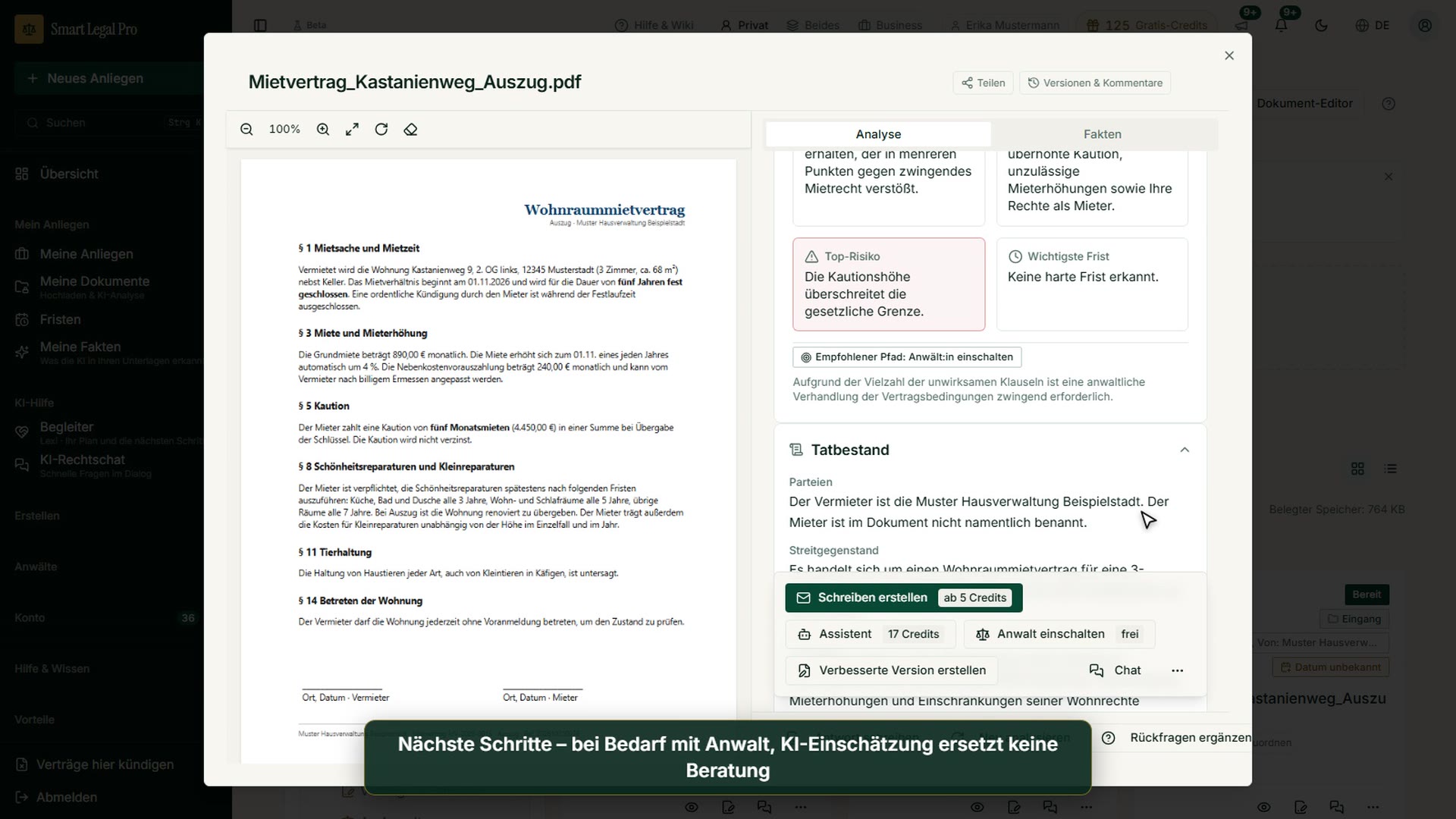
Contract analysis: top risk, key deadline and recommendation
Further down in the analysis are two tiles: the top risk, here the deposit amount assessed as legally inadmissible, and the key deadline, here “No hard deadline detected”. Next to it the app names a recommended path, in this example “Negotiate”, with the note that critical clauses must be renegotiated before signing. Below, the section “Facts of the case” describes in simple words who the contracting parties are and what it is about. This way you see before signing where you should ask questions.
Ändern und vergleichen
Images: 2Adapt a contract: state your change requests in your own words
The page helps to revise an existing contract. You upload a contract as PDF, Word file or text, or choose it from your documents; you do not have to start an analysis beforehand. The AI then asks targeted follow-up questions and delivers concrete change proposals. The note “You decide” explains that you can accept or reject each proposal with a checkmark and nothing is adopted silently. Anyone who has no contract yet creates one from a template.
Contract comparison: check two versions side by side
Here you choose two documents, the original on the left and the proposal or new version on the right, either by uploading or from “My documents”. The AI compares the contracts clause by clause, highlights differences in substance and estimates how your risk changes; purely formal rearrangements it hides. With “Start comparison” you begin the comparison. For versions of the same contract you created yourself, the tip names the free version comparison as more precise.
Verträge erstellen
Images: 3Creating contracts: templates for Germany, Austria and Switzerland
The page introduces the contracts area: you choose a country, answer questions in an assistant and receive the contract as PDF and DOCX. Every contract type exists as its own template per legal system, not as a translated uniform text. You do not have to rewrite existing contracts; the revision tool reworks them with a traceable comparison of the changes. At the bottom, Lexi offers to suggest the suitable template if you are unsure. Templates are aids; you check the content yourself.
Model contracts: a separate version per country instead of translation
The excerpt explains why model contracts have a separate version for each country: a German template does not automatically fit Austria. Each version contains the choice of law, the place of jurisdiction and the formal requirements that apply there. You do not download a PDF to fill in yourself, but answer questions in the assistant, which checks mandatory details and offers optional clauses only where they fit. At the end you get DOCX and PDF, and on request the handover to a lawyer.
Non-disclosure agreement (NDA): explanation and sample preview
The detail page explains what a non-disclosure agreement is: the parties undertake not to pass confidential information on to third parties and to use it only for the agreed purpose. Badges show that the template is available for Germany, Austria and Switzerland. With “Create contract” you start the assistant, “Pricing & credits” leads to the costs. On the right you see a sample preview with parties and sections such as confidentiality, exceptions and term.
More categories
- Case file & facts 40
- Deadlines 13
- Pleadings & editor 20
- AI assistant 19
- Lex & Lexi 19
- Contracts 15
- Firm & DMS 24
- Research & knowledge 20
- Client portal 11
- Settings & firm 8
- Understanding proceedings 28
- Letters & replies 13
- Creating contracts 11
- AI legal information 7
- Calculators 9
- Tools 28
- Legal knowledge 6
- Account & credits 6
- The website 40

Try it yourself
Start free, upload a letter, check a deadline – no credit card needed.

