Images
Calculators
Free calculators: legal fees, notice periods, severance, flight compensation, child support and more — with a traceable calculation and a shareable result.
All recordings use fictional sample data – no real cases, people or file numbers. AI output can contain errors and does not replace legal advice.
Arbeit und Kündigung
Images: 4Calculate a notice period: earliest end of contract under § 622 BGB
On the left you choose who gives notice, enter the start of employment and the receipt of the notice, and mark a termination during the probationary period if needed. On the right appear the earliest end of the contract, the applicable period and the length of employment in full years together with the legal basis. In the example, twelve years of employment and receipt in October lead to five months to the end of a month, that is, a contract end at the end of March 2027; the figures are a worked example. This shows you in seconds whether the period stated in the termination letter matches the statutory scale. The notes below remind you that an employment or collective agreement may provide for longer periods and that a three-week deadline applies to a dismissal protection claim.
Notice period calculator on a smartphone: result on a small screen
The view shows the calculator on a smartphone: the fields for start of employment and receipt of the notice are stacked, with the result below. You enter the two dates, tick the box for the probationary period if needed and read off below the end of the contract, the applicable period and the legal basis. With the buttons Copy result and Share you pass the information on to family or colleagues. The calculator runs in the browser without sign-in and offers the same inputs on a smartphone as on a computer.
Severance calculator: benchmark and range from salary and years of service
On the left you enter the gross monthly salary and years and months of employment, and the estimate appears on the right. The rule of thumb counts half a gross monthly salary per year of employment, so in the example with €4,200 and twelve years it is €25,200; a lower and an upper limit show the range for settlement negotiations. This gives you an anchor for the conversation with the employer before you sign anything. All figures are a worked example, and the risk box below makes clear that severance pay is a matter of negotiation and that a blocking period (Sperrzeit) for unemployment benefit may apply.
Employment reference code: phrases translated into school grades
The table “Performance assessment” sets phrases from employment references against their plain meaning, with school grade, rating and source. A sentence like “stets zu unserer vollsten Zufriedenheit” (“always to our fullest satisfaction”) stands for German grade 1, “zu unserer Zufriedenheit” (“to our satisfaction”) for grade 4, and rows labeled “Red code” point to hidden criticism. You pick out the phrase from your own reference and see what it means by common reading. Court decisions and specialist literature are named as sources; the classification is an interpretive aid and not a judgment on your reference.
Familie und Unterhalt
Images: 2Child support calculator: payable amount per Düsseldorfer Tabelle
On the left you enter the adjusted net income, choose whether the paying parent is employed and add age and child benefit for each child. On the right the calculator shows income level, need rate, self-retention amount and remaining income and, for each child, the table amount, the offset of child benefit and the payable amount. In the example, €3,200 net and an eight-year-old child lead to level 4 and a payable amount of €512.50 per month; this is a worked example and not a statement about your case. This lets you roughly classify a claim or a payment, and the legal basis is shown below the result. The Düsseldorfer Tabelle fits as a reference work.
Düsseldorfer Tabelle: child support needs by income and age
The table lists the income groups from level 1 to 15 with the adjusted net income, the percentage, the amounts for four age bands (0 to 5, 6 to 11, 12 to 17 and from 18 years) and the needs check. With two buttons at the top you switch between the table amount (need) and the payable amount after child benefit. You find the level of your income and read off the amount for the child’s age without using a calculator. The version currently in force is what counts; the payer’s self-retention amounts (Selbstbehalt) follow below.
Geld und Kosten
Images: 3Default interest calculator: interest and calculation steps for a claim
On the left you enter the principal claim, the start of default and the cut-off date and state whether creditor and debtor are consumers or businesses. On the right is the sum of default interest and the flat reminder fee, plus the number of days and the legal basis; a collapsible section shows the calculation periods when the base interest rate changes. In the example, €2,500 since March 2025 over 599 days gives €267.52 interest when a consumer is involved; this is a worked example. According to the source line, the base interest rate comes from the Deutsche Bundesbank, and the €40 flat fee can be ticked if the debtor is a business.
Criminal defense costs: estimate fees by stage of proceedings
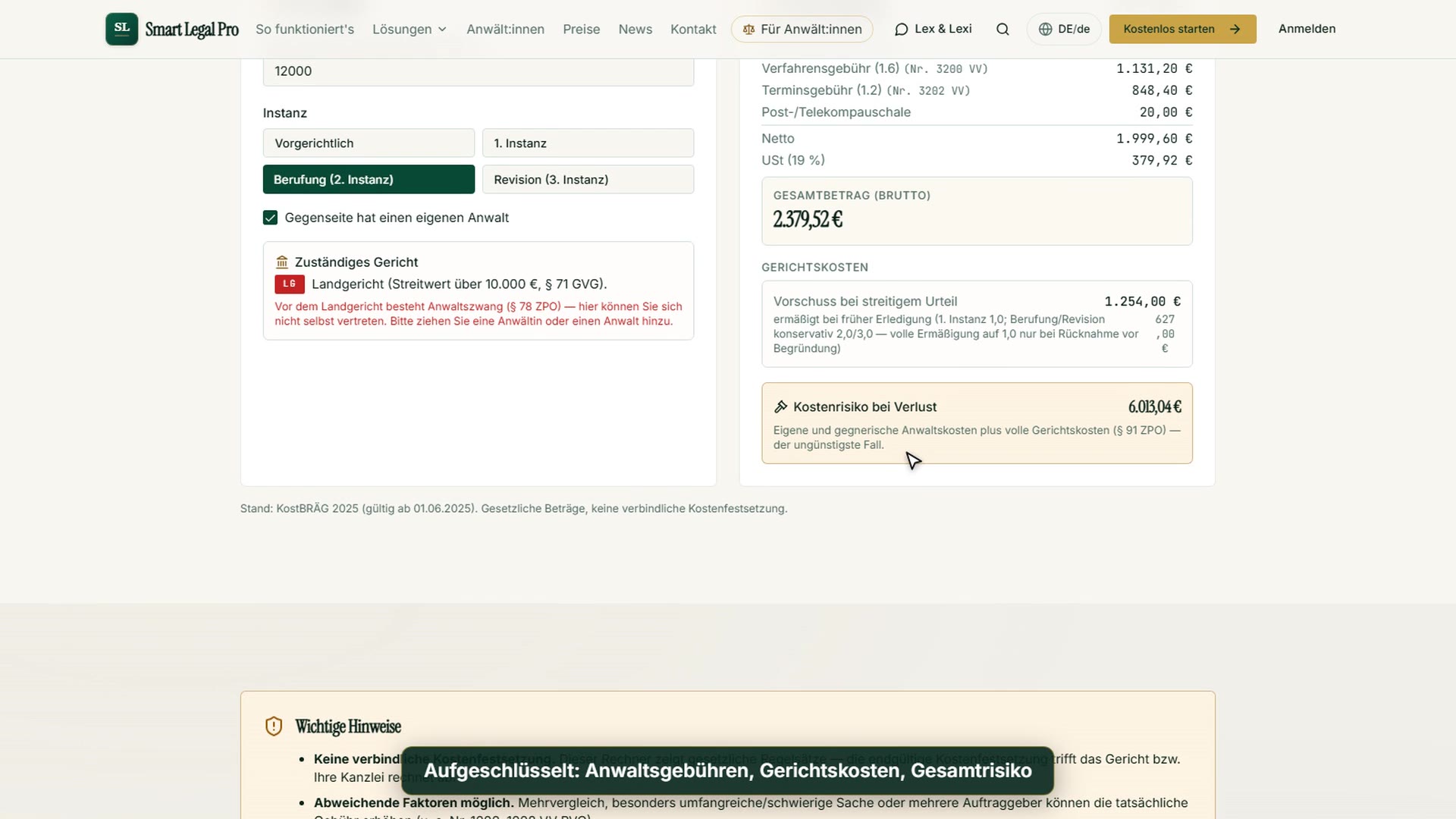
On the left you choose between criminal proceedings and administrative fine proceedings, the instance from the local court to the appeal on points of law, whether there were preparatory proceedings and a main hearing, and whether a retained lawyer or a court-appointed defense counsel is involved. On the right the cost estimate lists the individual fees with the numbers of the remuneration schedule, the postage and telecommunications flat rates, the VAT and the total. In the example (local court, retained lawyer) the result is €1,197.14 gross; the calculator names the mid-range fee as a benchmark that can deviate in an individual case depending on scope and difficulty. This shows you before the first meeting what defense costs are made up of; it is not a binding cost assessment.
Flight passenger rights calculator: lump sum and assessment for delays
On the left you choose the departure and arrival airport, enter the arrival delay in hours, mark a cancellation and state where the airline is licensed. On the right appear the lump sum under Article 7 of Regulation 261/2004, the calculated great-circle distance and an assessment of the claim. In the example Frankfurt–Lisbon with a four-hour delay, this gives 1,874 kilometers, a €400 lump sum and the assessment “Claim likely”; this is a worked example. The calculator notes that extraordinary circumstances can eliminate the claim; the assessment is an orientation and not a promise.
Matching videos


More categories
- Case file & facts 40
- Deadlines 13
- Pleadings & editor 20
- AI assistant 19
- Lex & Lexi 19
- Contracts 15
- Firm & DMS 24
- Research & knowledge 20
- Client portal 11
- Settings & firm 8
- Understanding proceedings 28
- Letters & replies 13
- Creating contracts 11
- Checking a contract 9
- AI legal information 7
- Tools 28
- Legal knowledge 6
- Account & credits 6
- The website 40

Try it yourself
Start free, upload a letter, check a deadline – no credit card needed.

