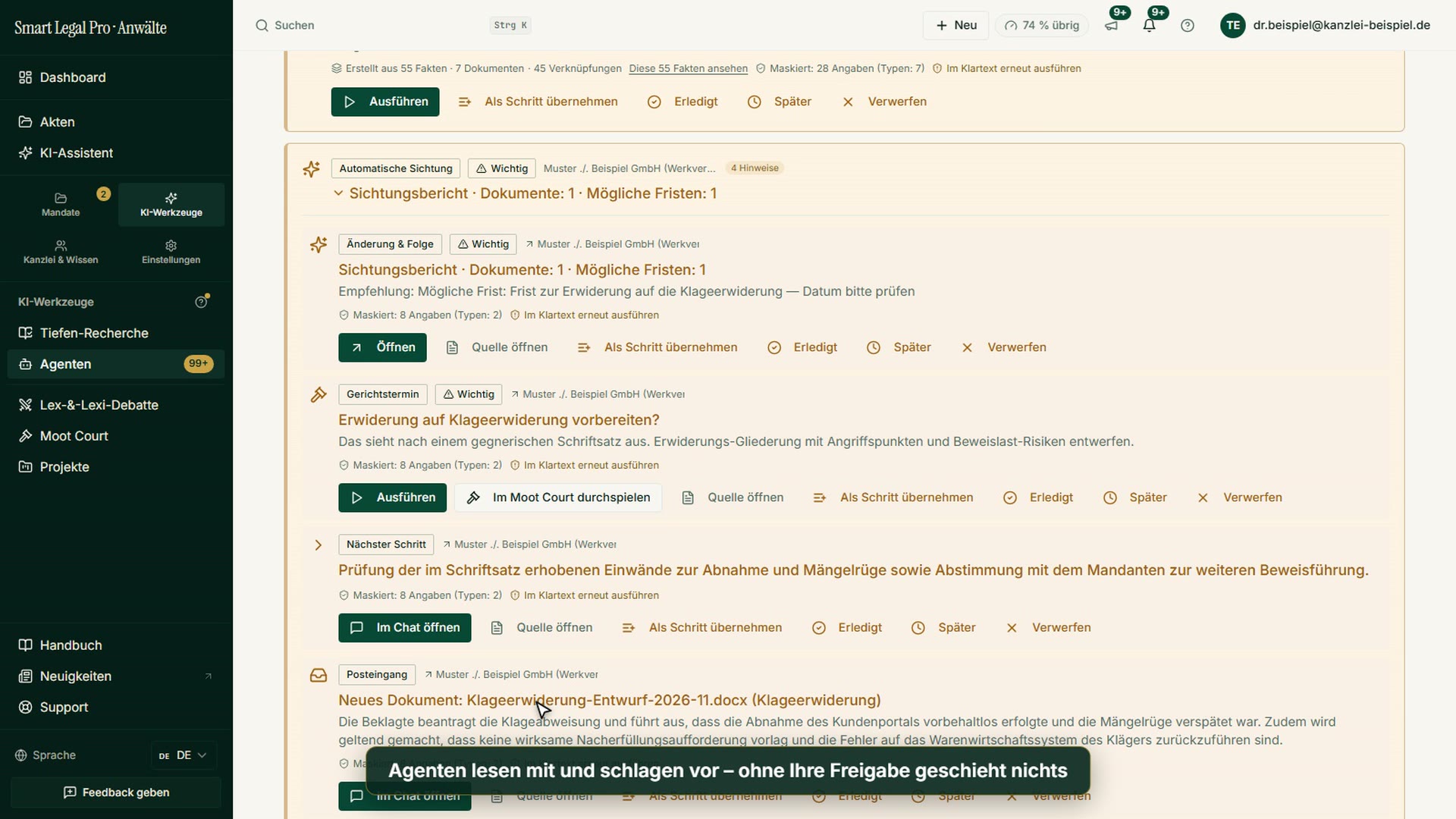
The AI that doesn't wait until you ask.
Most legal-AI workspaces are assistive: you ask, the AI answers. Our AI suggestions arise proactively — the AI checks new documents itself, flags what's missing and researches open legal questions. You approve.
New document — the AI gets going
As soon as a document lands in the file, triggers fire automatically: inbox triage, updating the relationship graph, and on the first document a one-click onboarding suggestion. Day and night.
- A trigger on every document — no manual start needed.
- Notes, deadlines and open items in your cockpit each morning.
- On by default, switchable off at any time (opt-out).
- New document detected in the file
- Triage: statement of defense, deadline 21 days
- ›Relationship graph updated, contradiction flagged
- Note to cockpit — approvalApproval required
What's missing — the AI flags it
The agent checks, by case type and jurisdiction, which records and client details are missing — and drafts a ready-to-send request. The client uploads without a login, and the request fulfills itself.
- Missing records and details recognized by case type.
- Closed loop: request → login-free upload → done.
- Employment contract — not in the file
- Proof of service of the termination — open
- Request to client prepared (ready to send)
Researches — and substantiates it visibly
When the agent recognizes an open legal question, it researches on its own and runs every source through the citation gate before it counts as verified. What's verified carries a visible badge; the confidence is stated.
- Independent research on a recognized open legal question.
- A source only counts as verified after the citation gate — with a confidence rating.
- § 4 KSchG — deadline confirmed (high confidence)
- BAG on constructive service — citation verified
- Contested side issue — check before use (low confidence)
Actually reads the source — and asks first
When an answer would clearly benefit from current information, the assistant offers a search instead of guessing. An anonymous legal-topic query runs without asking, through its own jurisdiction-filtered legal-sources index; a search naming a specific person or company runs only after your explicit consent. A named web page is actually fetched — not guessed at.
- Anonymous topic search without asking, named research only with consent.
- A real page fetch hardened against internal networks, instead of a guess.
- § 650f BGB — confirmed in our own legal-sources index
- Recent decision — citation with its source
- Page read in full (no guessed text)
Five watchers keep an eye on every case — for free
Five watchers monitor every case file for free — deterministic, no AI quota. What the AI does beyond that, you decide on a single screen: the autopilot.
- An approaching deadline or hearing, a silent client, an overdue document request, an unresolved contradiction in the relationship graph, a run that has definitively failed — five fixed checks, no language model running in the background.
- Three automation levels per firm or per case: Off · Suggest · Handle it — changeable at any time.
- A one-click emergency brake pauses every automatic run for a full week; a weekly digest shows what was done and what it cost.
- Statement of defense due in 3 days — flagged
- Client silent for 12 days — flagged
- Requested record overdue for 9 days
- Contradiction in the relationship graph unresolved
Answer an opposing pleading without clicking twice
Other workspaces let you chain individual AI building blocks into your own “workflows”. With us, the most common case is already wired up: replying to an opposing pleading automatically triggers a verified citation check — and, if any citations remain unresolved, a suggested next step. One click starts the whole chain.
- Four fixed flows: set up a new case, answer an opposing pleading, prepare for a hearing, follow up with a client.
- Every step is visible with progress tracking — no black-box batch.
- Approval stays mandatory in every flow: anything sent to a court or a client always needs your confirmation.
- Reply to opposing pleading drafted
- Citations checked automatically
- Next steps suggested — your approvalApproval required
No kit you have to assemble yourself first
Other law-firm AI workspaces chain individual AI building blocks into so-called “workflows” that you assemble yourself. With us, the watchers are already keeping an eye on things for free before you even start a flow — and what the AI has done for you beyond that, you can read in a dedicated overview every week.
How our agents worked for you this week — read onAgents in this workflow
Checks new documents proactively — even at night — and places notes, deadlines and open items into the cockpit.
Classifies incoming documents, extracts deadlines and detects opposing pleadings.
Checks for missing information by case type and jurisdiction — with a client follow-up on request.
Detects deadline-triggering events in the case file and proposes the deadline with its calculation — entered only after your approval.
Drafts a reply to an opposing pleading — the starting point of the “answer an opposing pleading” flow.
Automatically checks every citation in the reply before it counts as verified — the second step of the same flow.
Builds the relationship graph via map-reduce across the whole case — facts, relationships, case state with gaps and contradictions.
Ingests new documents, detects corrections (changed values) and updates the graph incrementally.
Control & safety
- Every suggestion is a suggestion — you approve, discard or edit.
- You set the autonomy per task type; client messages never go out without approval.
- Reversible actions with an action ledger and audit log.
- Low confidence forces a review — regardless of the autonomy level.

Let your case files think along.
The AI lawyer portal — EU-hosted, profession-compliant, client-separated. You keep control, the AI does the groundwork.