Your AI lawyer portal — for your own case files.
The lawyer portal works like a digital law firm: the mailroom assigns incoming mail, the case file holds the facts together with a sourced fact graph, agents prepare, the assistant drafts the pleading, “Finalize” packs it with numbered exhibits, and in moot court you rehearse the hard questions. You decide, the AI assists. And if a consumer on our side realizes she needs legal help, you can take on the matter. Can — nobody has to.

What Smart Legal Pro does for your firm
Mandates, case analysis, drafts and audit trail — in an environment built for how lawyers actually work.
AI pre-analysis included
Risk, recommendation, legal citations and red flags at first glance.
ViewIncluded in your plan
AI assistant, agents, the Lex & Lexi debate and case intelligence in your firm's subscription — with fixed monthly quotas instead of per-action billing. The marketplace is not part of the subscription: use it free of charge if you want to.
ViewProfessional rules compliant
Manually verified admissions, RDG/BORA guardrails, audit log.
ViewEU hosting & RLS
Data on EU servers, client-separated, signed URLs for documents.
View
A sample case to try things out — without using AI quota
Deadlines only when the document itself backs them up
A collision check across your own case files
Agentic Law
What Agentic Law means at Smart Legal Pro
Agentic Law means AI agents carry out entire steps of the work on their own — researching, drafting, reviewing — instead of just answering a prompt. EU hosting, confidentiality and whole-file AI are table stakes now; the difference lies in the depth of that autonomy and in the safeguards around it — here are the points that matter.
Proactive, not just assistive
Most legal-AI workspaces wait for your prompt. Our agents check new documents on their own, flag missing records and research open legal questions — you only approve.
ViewSimulation, not just an answer
Moot Court plays out the hearing, Lex & Lexi debate your case from two perspectives. Interactive sparring that pure question-and-answer assistants don't offer.
ViewVisible verification
In the AI chat, in the Lex & Lexi debate and in the playbook check, every cited provision automatically runs through a check gate against official sources; for drafted filings you trigger the same check on demand. What's verified carries a visible badge, what's unsupported is flagged. No black box — you see what's substantiated.
ViewA draft that counts its sources
Every draft filing states, at the end, exactly how many facts, links and documents it drew on — including which were read verbatim and which only via a summary, plus an explicit note for any document without readable text. You never approve what you cannot trace.
ViewBuilt for solo and small firms
Access from the very first seat, with no license minimums or enterprise entry threshold. Exactly the segment large vendors leave underserved.
ViewAutonomous, never uncontrolled
You set the autonomy level for every agent; sending anything to court or client always needs your approval. Every change can be undone, and a built-in brake stops a bulk upload from triggering hundreds of automatic runs.
ViewCalculators, not guesswork
We don't calculate deadlines, statutory fees or court costs with AI — we use the same deterministic, officially verified formulas as our free public calculators; the AI only calls them as a tool.
ViewResearch that archives its sources
A research opinion is built in stages: our own body of statutes first, then the matter, then the web. Every web source is actually retrieved and, where possible, archived; every verbatim quote must be findable on the page; statutory citations are checked against the official wording. Whatever remains open gets its own section.
ViewLawyers pay a subscription
Your AI tools run in the portal subscription with a monthly allowance — no billing per click. Credits are purely a matter for the consumer side.
See pricing & quotasClaude Fable 5 as its own add-on
Anthropic's most capable model as its own add-on — for demanding contracts and opinions, with its own monthly quota.
Discover Fable access
We are still evaluating our prices and will adjust them if necessary. A running subscription keeps its price and service until you change or extend your plan; we will then show you beforehand what changes.
EU hosting, § 203 StGB, GDPR/BRAO, seven languages and whole-file AI we treat as a duty, not a differentiator — Smart Legal Pro meets them (see Conflicts & Compliance) but wins on the points above. Our own market assessment, as of 08/2026, without warranty.
Why Smart Legal ProClient portal
One access for your clients, not a second system for you.
Your clients see exactly what you share, in the same Smart Legal Pro account — documents, deadlines, drafts. Everything else stays inside your firm, and every access is logged.
- Your clients see only what you expressly release — documents one by one, deadlines one by one. Internal drafts and notes stay invisible.
- Request documents instead of email ping-pong: uploads land in the case file, first in quarantine — the AI reads them only once you release them.
- Every document access is logged. The AI helpers run on your firm's allowance — your clients never pay and see no purchase screens.
- Your firm's logo and accent color in the portal header — a trust anchor at no extra effort.
Agents & capabilities
Your AI workbench in detail
The showcase tours show what the agents actually do — on a realistic case, step by step. You decide, the AI thinks along.
Case file & knowledge
The case file that thinks along
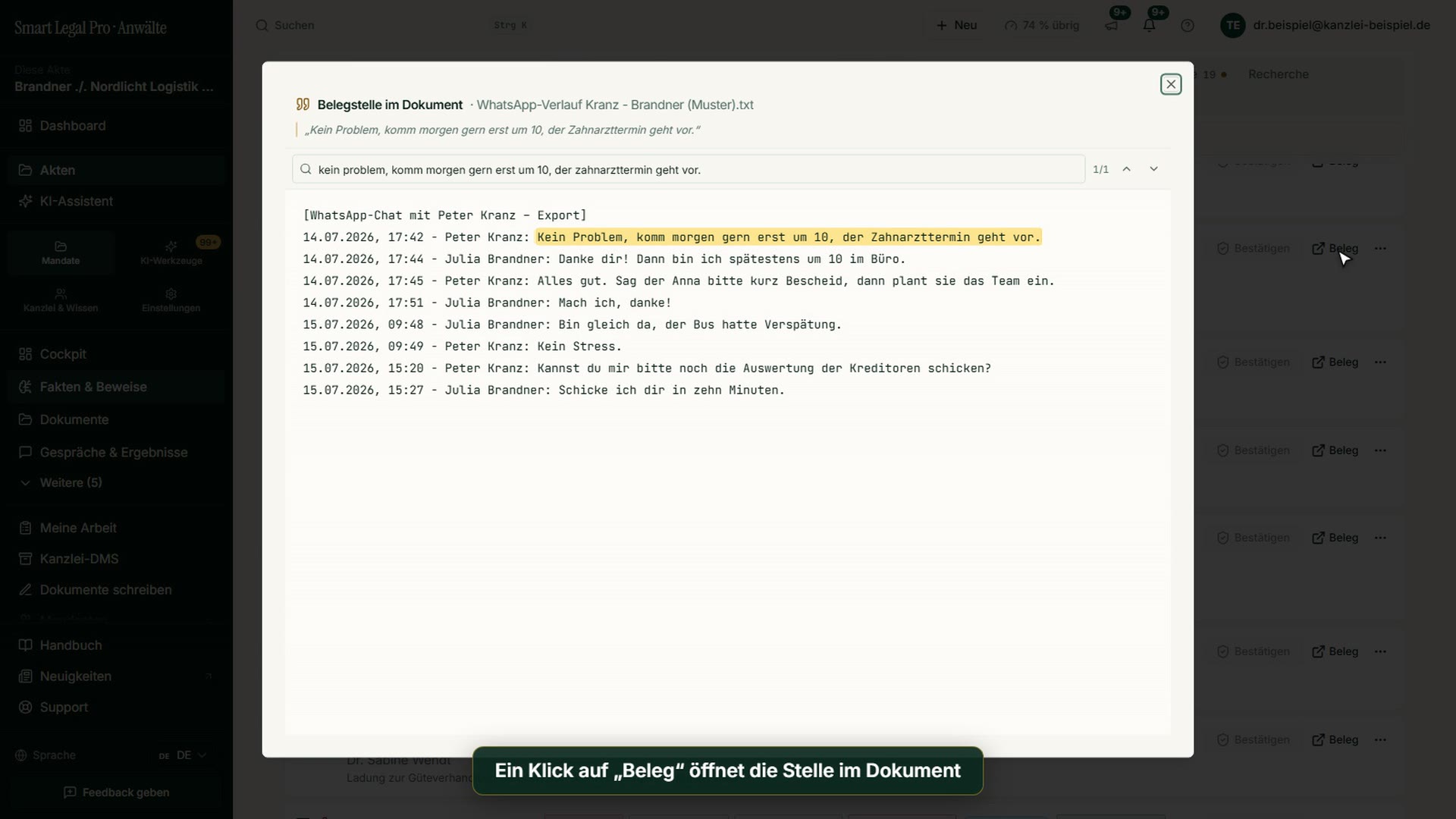
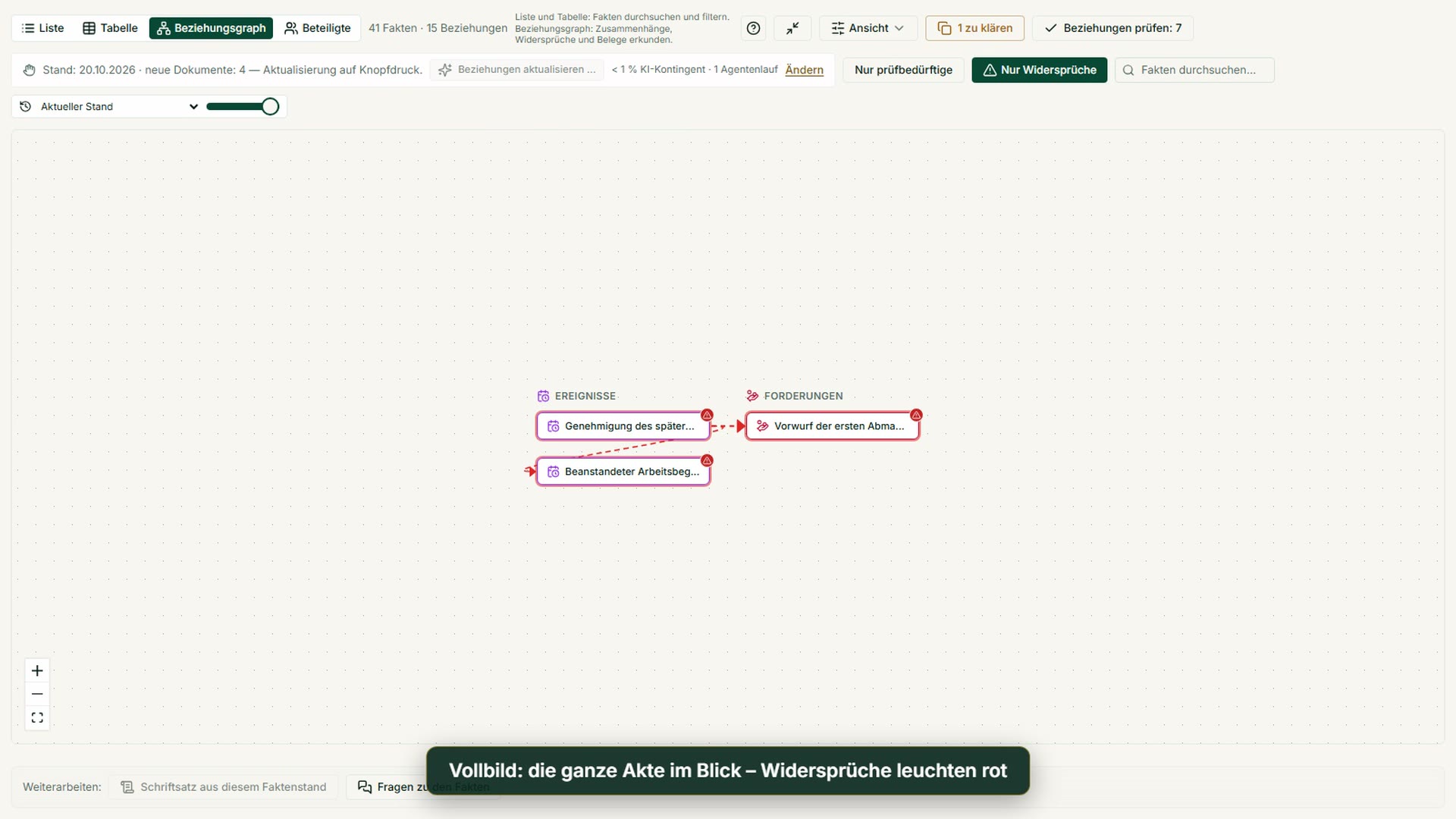
Relationship graph, timeline and evidence matrix instead of a pile of documents — evaluate many documents in the document table with a source for every cell.
ViewDMS & case cockpit
Documents, versions, legal hold and a case cockpit the AI reads along.
ViewMailroom
Forward e-mails to your firm address: sort them, file them to a matter with one click, summary and reply draft on request – without access to your mailbox.
ViewDocument table
Many documents, one table: You define the columns, the AI enters the values with the verbatim passage – the software calculates totals, gaps, and deviations.
ViewCounterparty memory
Firm-wide knowledge about opponents from earlier matters — observations, never evidence for the current case, and labeled as such.
ViewCourt cases & exhibits
Instances, the series of pleadings, exhibits with number, version and stamp, verbatim excerpts as exhibits of their own: a life cycle instead of a single document.
ViewCase timeline & offers of evidence
Hearings, pleadings, events, witnesses and offers of evidence in one list, plus client view, search and working file.
ViewDeep research
Seven phases with a dedicated counter-check; statutory citations are checked against the official wording. Costs arise only after you approve the research brief.
ViewLegal library & citation network
Statutes and decisions in the in-house legal library; the citation network shows which decisions rely on which provisions and on each other.
ViewFirm memory
Closed cases become anonymized knowledge pages and earlier pleadings are ready for the next matter – effective only after your confirmation.
View
Drafts & contracts
Pleadings & contracts
Draft with approval and citation check, then “Finalize”: pleading and stamped exhibits as one organized package.
ViewCanvas & Redline
Document editor with page view: AI on the selected text, changes as suggestions, version comparison, sharing with clients.
ViewFirm playbook
Extract your firm's standards from the firm DMS, check third-party documents against them — confirmed positions feed into contract drafting.
ViewContract workbench
Briefing, interview, versions with provenance, clause-by-clause revision and client feedback in one place – the AI proposes, you decide.
ViewExhibits by jurisdiction
Exhibit wording, numbering and indexes follow the jurisdiction of the case file; every entry carries its confidence level and source.
ViewReview cockpit
One click reviews a contract or pleading section by section – every finding in place, with suggestion, severity and legal basis; nothing changes without your click.
View
Sparring & simulation
AI assistant & Lex & Lexi debate
A chat that asks back instead of hallucinating — plus the Lex & Lexi debate.
ViewAssistant workshop
History with a progress summary, branches, projects with sister cases, Word editing with tracked changes and the check of your exhibits – everything stays in your hands, one click at a time.
ViewProjects & sister cases
Related cases as one project: a single deadline sequence, a cross-check and chats across several cases – sister cases only after you release them.
ViewBranches & variants
Branch a variant from any answer, compare versions side by side and set the main version with one click.
ViewFor large firms
Contract file with every version, redline export, contract packages and a free package check – in the lawyer area with free-form AI instead of a template catalog.
ViewWord editing
The assistant edits your Word file paragraph by paragraph, with tracked changes, comments and redline plus clean copy on request.
ViewLex & Lexi debate
Two AI voices debate your case — argument and counter-argument.
ViewMoot Court
The hearing simulator: the hardest questions before the court asks them.
ViewRead up, don’t guess
The assistant reads the case file in a fixed order – overview, facts, wording – and asks first before a large read, with the cost.
View
Proactivity & deadlines
Companion in the portal: Lex or Lexi
Tells you for each case file what's next, reads documents on request with a verbatim source passage and takes you to the right feature — reading and answers count against your AI quota, never in euros; nothing starts without your click.
ViewProactive agents
Event triggers, completeness checks and self-research with visible verification.
ViewDeadlines & court prep
Mailroom with assignment, sourced deadline suggestions and moot court preparation.
ViewNext-steps checklist
A checkable task list per case with a legal basis per item and a court-date gap check — never runs automatically, you trigger it.
ViewLegislation monitors
Subscribe to a statute — when its wording changes in our in-house legal corpus, the platform notifies you; per case or firm-wide.
ViewMy work
Next steps (assignable across the team), deadlines and pending agent approvals on one page.
ViewRVG/GKG fee calculator
Calculate attorney and court fees straight from the case's amount in dispute — every formula verified against the official statute; the AI assistant uses the same calculator as a tool instead of computing fees itself.
ViewDeadlines in your own calendar
Deadlines, peremptory deadlines, resubmissions and hearings can be subscribed to in Outlook, Google or Apple Calendar – with neutral titles and no client names.
ViewCheck e-invoices
Check XRechnung, ZUGFeRD and Peppol against the published rules, without AI – every violation with rule number, location and plain-language explanation.
View
Clients & collaboration
Client portal
Clients submit documents, answer queries and see approvals — access to every document is logged.
ViewRequests via magic link
Document checklist, document approval or a client conversation via an expiring one-time link — no portal account needed.
ViewClient memory
Firm-wide knowledge about a client that carries across their cases — suggested from case facts, saved only after your confirmation.
View
Security & confidentiality
Conflicts & Compliance
Conflict of interest, § 203 StGB, EU hosting and AI labeling.
ViewPrivacy masking
The platform detects personal data itself – rule-based, with no second vendor and no model that has to guess names. We state the limits openly.
ViewTwo-factor sign-in
A code from the authenticator app protects access to your case files – optional for everyone, mandatory for the whole firm on request.
View
Agents in action
The platform works proactively with you
Two examples of how the agents take on work without taking away your control — you approve every step.
Proactive case scan
An automated background agent reviews new documents — overnight, too — and places hints, deadlines and open points in your cockpit by morning. You decide what enters the file.
- New documents in the file detected
- Deadlines, amounts and risks extracted
- ›Reconciled with the relationship graph
- Hint placed in the cockpitApproval required
Moot court: what will the other side argue?
Lex and Lexi play your case as a debate and anticipate the opposing side's arguments — so you see the main line and the risks before the court does.
Formally: the claim should be dismissed for lack of conclusive pleading on receipt.
Risky — the court could assume receipt via prima facie evidence. Second line: prepare a severance settlement in the alternative.
Agreed: primary motion to dismiss, signal willingness to settle in the alternative.
AI is reshaping legal — all in one platform.
Smart Legal Pro unites both in one product: the intake, analysis and decision layer for consumers and SMBs — and the AI lawyer portal for the firm's operational case work.
Fast orientation and safe prep work
- - Legal questions without a document, structured AI triage
- - Follow-up chat, retests, exports, transparent credits
- - Export of your documents for your lawyer
Operational case work with AI
- - AI assistant, agents and the Lex & Lexi debate for case work
- - A case file that thinks along: relationship graph, chronology & evidence, DMS
- - Client portal, mailroom and outgoing mail from the case file
Case intelligence
The case file that thinks with you
From your documents the co-pilot builds a sourced knowledge graph — and drafts pleadings from it. You upload, the AI understands the connections.
Relationship graph, not keyword search
Facts as nodes, relationships as edges (witness-for, contradicts, evidence-for) — visual, sourced, confirmed by you. Understands the whole case, not isolated hits.
Living case summary with history
A summary per document plus a chronology; on every new filing you see the diff (what changed) and can travel back in time.
AI that thinks along
Spots temporal and logical contradictions and legal consequences — under the relevant jurisdiction's law — and flags missing exhibits proactively.
Client knowledge & conflict alerts
Knowledge per client, kept separate; if a client is on your own conflict block list, the assistant warns you before it replies.
Firm memory
Your firm learns as it works — and you stay in control
Closed matters become confirmed knowledge pages, earlier pleadings are ready for the next matter, and every answer shows what came from memory. Nothing enters it without your confirmation.
Learned from matters
When a matter closes, the AI proposes anonymized patterns — how you argued, how the other side proceeds, how a court decides. Every page is backed by sources from your matters.
Your own prior work on call
“How did we handle this last time?” — the assistant, the canvas and the drafting agents find your earlier pleadings and analyses on their own.
Clients and opposing parties
Knowledge about clients and recurring opponents is ready in every matter. The AI never receives content from other clients’ matters.
Only with your confirmation
Every suggestion waits for you, you decide conflicts, and one switch per matter takes a matter out completely.
Case-file understanding
What the AI does with your case file
Provable in code — not a marketing promise.
Read complex case files in full
Map-reduce with no silent truncation; scanned documents via OCR up to 400 pages, interruptible and resumable. While indexing is still running, the AI honestly reports how far it has got — instead of quietly reading only the first pages.
Thinks along automatically with new documents
Every new document triggers relationship-graph building, chronology and onboarding via a database trigger — without you pressing a button.
Assertion, statement of fact, offer of evidence
Fact extraction types each finding — statement of fact, legal assertion, argument or offer of evidence — and shows it with its source in the document.
Facts & fields across all documents
Contract parties, deadlines, notice periods from all documents in a case file — as a table with source references, exportable.
ViewFinalize a pleading: exhibits numbered, renamed, stamped
One dialog from AI draft to organized package: the draft already cites the exhibits by number, and you adopt them with one click. The ZIP holds the pleading, renamed exhibits stamped on every page, a README with a checklist and an internal folder with a packing list. Verbatim excerpts from large exports become exhibits of their own. Filing stays your step.
ViewCase facts with and without a document
Every fact knows which exhibit it came from. See per document what it introduced and what it superseded — and compare the case facts with and without that exhibit. No AI cost.
ViewThe court case as a life cycle
Instances, stage and party role belong to the case: an appeal continues in the same case, and documents, facts and deadlines stay together. A register tracks the series of pleadings, including those from the other side and the court. Stage and role are suggestions with evidence that you confirm.
ViewCase timeline, witnesses and offers of evidence
Hearings, pleadings, orders, summonses, expert opinions and package states in one list; deadlines still arise only in the deadline register. You manage witnesses and experts as participants, and only your firm sees the summons address. For an evidence topic the AI makes an offer-of-evidence suggestion on request, not reviewed, which you confirm or discard.
ViewExhibit list as AI context, rejoinder delta, image description
The exhibit list is available to the AI functions as context. A reply can build on what is new since the previous pleading. The AI describes photos only when you click, with processing in the EU; the description is marked as not reviewed, and you assess its evidentiary value.
Collision check
Compares the names of clients, opposing parties and opposing counsel with your case files — near-exact and without AI. It does not find abbreviations or typos. You record the outcome with a reason. It does not replace your own conflict check.
A sample case in one click
A complete unfair-dismissal case to explore: documents, facts with sources, relationship graph, deadlines, assistant chats, the complaint in the editor and finished agent runs. Prepared in advance, view-only, no quota and outside the case limit — available before activation, in all seven languages.
Control & accountability
You stay in control — with the record to prove it
Every AI action visible, traceable and with before/after — provable in code, not a marketing promise.
One activity trail for everything
Events, agent actions, runs, document versions and relationship-graph changes merge into ONE filtered timeline — loaded page by page, token-sparing, nothing silently truncated.
Before/after at a glance
Where the AI changed something, a diff viewer shows exactly what was there before and what applies now — instead of just a label.
Firm-wide, strictly by access rights
Partners see their firm's team activity in one place — filtered by access rights at the database level, without exposing other clients' files.
Access log per document
Which shared document was opened or downloaded, and when, via the portal or a link — logged server-side; it proves the retrieval, not that anyone took note.
Extensive undo
Deadlines, drafts, case states and evidence analyses entered by the AI can be undone individually or as an entire agent run — only what's already sent honestly stays sent.
Complete, token-sparing case coverage
Even with many case documents the AI reads on demand instead of secretly capping — with an honest “n of m” note whenever not everything fits on one page.
Names are masked before the AI sees them
By default the portal replaces recognized names, addresses and account numbers with placeholders before text goes to the AI — with a preview and your own terms. This is not anonymization. Plain text is a deliberate, logged exception per request, chat or case; your firm can block it.
Two-factor sign-in and sessions
An authenticator app can optionally add a layer of protection to your account; the firm's owner can make it mandatory for the team. You can see and end active sessions yourself, and the portal signs you out automatically after a period of inactivity.
One portal for the whole case
Smart Legal Pro is your AI lawyers’ portal: assistant, agents, the Lex & Lexi debate, a case file that thinks along, a DMS and a client portal. Work on cases entirely in the portal or export the file to your own system.
- Getting started
- Sample case, no quota
- Case bundle
- JSON export
- Pricing
- Transparent, shown upfront
Case bundle as JSON
Every accepted file can be exported as structured JSON: facts, metadata, document URLs, AI analysis, generated letters, audit trail. Ready for import into your system.
Book a demoFAQ
What does it cost?
Firms use Smart Legal Pro on a subscription: the price applies per firm, one lawyer is included, and further lawyers are added as seats. Every plan includes a monthly allowance of AI units instead of billing per AI action; you top up or change plan when needed. You will find every plan and what it includes on our pricing page for firms. Once your bar admission has been verified, you can try the “Kanzlei Start” plan in a free trial (length and scope are shown in the plan overview); after that, AI features are only available with a plan.
Can I try the portal first?
Yes. You can try the sample case without using any AI allowance. After your admission has been verified, you test the entry plan in a free trial (duration and scope are in the plan overview). The trial includes one AI draft of a pleading; further drafts of pleadings and contracts come with a paid subscription. Finalizing, exhibit package, excerpts and reference check run without AI and without a subscription.
How does the portal handle confidentiality and AI?
By default, the portal replaces recognized names, addresses and account numbers with placeholders before text goes to the AI — this is not anonymization. Plain text is a deliberate, logged exception that your firm can block. We host in the EU; the measures under § 203 StGB (German Criminal Code), the sub-processors and the data processing agreement are documented. Whether and how you use AI in a matter is your decision — we provide the documents for it.
Is this suitable for larger firms?
Yes. There is no tier split — sole practitioners, partnerships and larger firms use the same platform and terms.
Who is liable?
The lawyer or firm engaged is liable for their advice. Smart Legal Pro is an AI tool and does not give legal advice. For details see the RDG notices & terms.
Multilingual by design
- languages, fully translated
- 7
- languages, fully translated
- texts per language, no gaps
- almost 33,000
- texts per language, no gaps
- help articles, each in every language
- 2,250+
- help articles, each in every language
Language is not jurisdiction: a document is reviewed under the law of its country, not the language you have selected.

Register as a lawyer now
The AI lawyer portal for your own case files — with client portal and case handover.