Images
Deadlines
Deadlines and hearings of a case at a glance: deadline register, deadline calculator with a documented date of receipt, and suggestions you adopt yourself. Nothing is entered without your confirmation.
Tip: click an image to open it large – use the arrow keys to move on.
Enter a Deadline, Strict Deadline, Follow-Up or Court Hearing in the Case
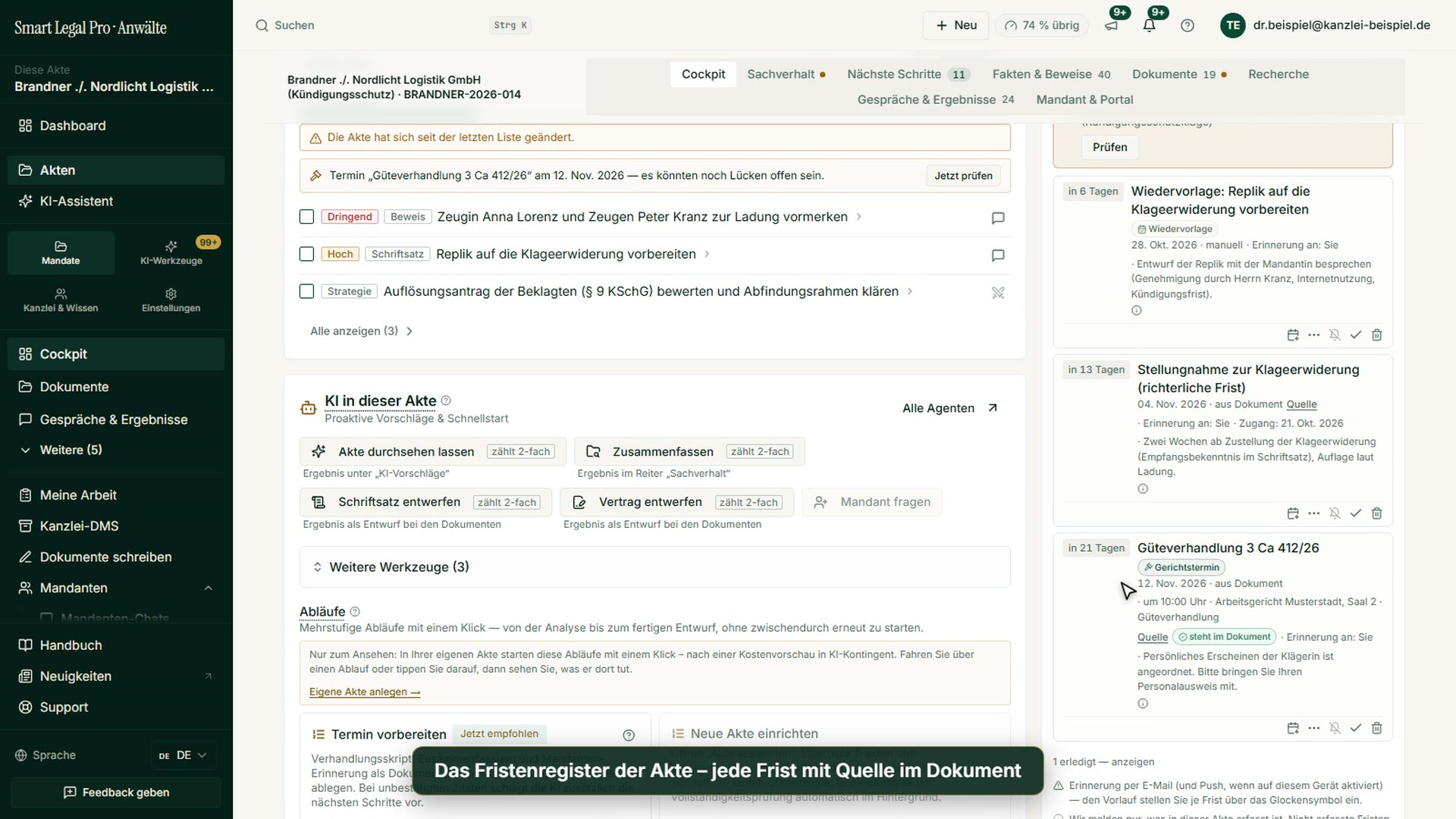
On the right in the cockpit, the deadline panel bundles the deadlines and appointments of the case. “Add deadline or appointment” opens the form with the four types Deadline, Strict deadline, Follow-up and Court hearing; you enter a label and date or have the deadline determined from an event date via “Calculate deadline”. There are also printing and the calendar export of all open deadlines as an .ics file. A deadline detected by the software waits with “Review” for your adoption and is monitored only afterwards. The note on the export reminds you to check whether your calendar service is approved for client data.
Page of this image →To the feature: Deadlines & court prep →Watch the video →
Deadline Calculator in the Case: End Date from Event Date and Statutory Period
In the case’s deadline panel, “Calculate deadline” opens the deadline calculator. It determines the end of the deadline deterministically from an event date and a statutory period, that is without model guessing. You choose the legal system, a template such as the appeal under §§ 517 and 520 ZPO, event date, amount, unit and optionally the federal state of the court location for public holidays. The notes in the form name the legal bases of the calculation. The result is a calculation aid that you review and adopt into the case as a deadline.
Page of this image →To the feature: Deadlines & court prep →Watch the video →
Deadline Calculator for Germany, Austria and Switzerland
The deadline calculator in the “Calculators & tools” area is a form with four mandatory details: legal system (Germany, Austria or Switzerland), event date such as service, amount and unit of the period. In addition you choose the federal state of the court location so that its public holidays are taken into account; without it, only nationwide holidays apply. The page notes that the calculation runs without AI and without quota use and that nothing is estimated. The calculation-aid note names for Germany § 222 ZPO in conjunction with §§ 187 to 193 BGB as the basis and stresses that your own deadline control remains decisive.
Page of this image →To the feature: Deadlines & court prep →Watch the video →
Calculators & Tools: Deadlines, Dismissal, Costs and Fees
The “Calculators & tools” page bundles calculators and reference works for daily work as cards: at the top the deadline calculator for Germany, Austria and Switzerland, below under “Employment & dismissal” the severance calculator, the notice period calculator and the employment reference grade code, further down costs and fees. Each card names the area of law and a short description and leads with “Open” to the respective tool. According to the introduction, calculation takes place directly in the browser, the legal status is Germany, and the results are indicative values that do not replace a review of the individual case. This way you handle typical calculation tasks of the firm in one place.
Mobile: Case Deadlines and Appointments on the Smartphone
The case’s deadline panel sits on the smartphone in one column: at the top “Add deadline or appointment”, print and the calendar export of all open deadlines as an .ics file. Below, a note reports that a detected deadline is waiting for your review and is monitored only after you adopt it, with the button “Review”. The cards below show follow-ups and deadlines with remaining time such as “in 7 days”, label, date, origin and reminder; symbols at the card edge serve to complete or delete an entry. This way you keep appointments in view on the go as well.
Page of this image →To the feature: Deadlines & court prep →Watch the video →
Deadline Calculator on the Smartphone: Germany, Austria, Switzerland
The deadline calculator on the smartphone shows the form one below the other: legal system (Germany, Austria, Switzerland), event date, amount, unit and federal state of the court location for public holidays. All four details are mandatory, as the introduction states; the calculation runs without AI and without quota use, and nothing is estimated. With “Calculate” you obtain the end of the deadline. A note below the form calls the calculation a calculation aid, your own deadline control remains decisive. This way you recheck a deadline between two appointments as well.
Page of this image →To the feature: Deadlines & court prep →Watch the video →
Case Deadline Register: Type, Date, Reminder and Source of Every Deadline
The case’s deadline register sits on the right in the cockpit: each deadline carries its type, such as follow-up, court-set deadline or court hearing, the date, the reminder and the number of days until it is due. If a deadline comes from a document, a source is shown, and the court hearing additionally carries the note “stated in the document” as well as time, court and courtroom. On an entry you complete, postpone or delete it. A detected deadline waits in a box of its own for your review and is monitored only after you adopt it.
Page of this image →To the feature: Deadlines & court prep →Watch the video →
Appeal Deadlines Calculated: Appeal and Grounds from One Service Date
In the deadline calculator you choose the legal system and the template “Appeal” and enter the service date of the full judgment. One click on “Calculate” yields the appeal deadline under § 517 ZPO and the appeal grounds deadline under § 520 ZPO (German Code of Civil Procedure); if a deadline ends on a weekend, it is moved to the next working day and shown as such. With “Enter both deadlines” you adopt both into the register. The calculator works without AI, only from the recorded receipt, the results are guidance, and your own deadline control remains decisive.
Page of this image →To the feature: Deadlines & court prep →Watch the video →
All recordings use fictional sample data – no real cases, people or file numbers. AI output can contain errors and does not replace legal advice. The screenshots show the English interface; sample data and documents are partly in German. Smart Legal Pro itself is fully available in German, English, French, Italian, Spanish, Dutch and Polish.
More categories
- Case file & facts 43
- Pleadings & editor 40
- AI assistant 35
- Lex & Lexi 20
- Contracts 26
- Firm & DMS 52
- Research & knowledge 21
- Collaboration & sharing 21
- Client portal 33
- Settings & firm 10
- Understanding proceedings 43
- Letters & replies 11
- Creating contracts 15
- Checking a contract 6
- AI legal information 30
- Calculators 10
- Tools 35
- Legal knowledge 2
- Account & credits 12

Try it yourself
Start free, upload a letter, check a deadline – no credit card needed.

