Images
Letters & replies
Letters and replies: a catalog and assistant for reply letters, a wizard with the cost shown up front, and free writing when no template fits.
Tip: click an image to open it large – use the arrow keys to move on.
Vorlage finden
Images: 3Create a letter: choose a template or write freely with the assistant
At the top the page explains the process in three steps: choose a template, enter data, download the finished PDF or Word document. Below are two alternatives: the writing assistant for cases without a fitting template and the route via an uploaded letter you want to reply to. With the filters “Work”, “Rent”, “Claim” and others you narrow down the catalog, and each template shows a short description and price. At the top you choose the legal system, here Germany. Templates are aids; you check the content yourself.
Mobile: choose letter templates on the smartphone
On the smartphone, the catalog “Lawyer-curated letters” shows template cards with a topic badge, country and language code, title and a short description. With “Create now” you start the letter, for example a claim for return of the rental deposit or a rent reduction notice. The description under the headline says that AI suggestions as well as a plausibility and legal basis check are included and that credits are deducted per letter. This way you find the matching template on the go before entering any details.
Letters for tenants: deposit, reduction, utility costs and rent increase
The letter catalog shows two areas for rental questions. At the top are curated letters such as reclaiming the rental deposit, notifying a rent reduction and terminating the lease; “Create now” starts the assistant, and the cost note says that credits are deducted per letter. Below are templates for reply letters, for example on the utility cost statement or on the rent increase; here the catalog recommends uploading the original letter first so the details are filled in automatically. If nothing fits, the box “Nothing suitable here?” leads to free writing, because templates are only hints.
Schreiben erstellen
Images: 7Letter assistant: notifying a rent reduction in a few fields
The assistant guides you step by step through the details for a rent reduction notice. At the top is the legal framework: a notice of defects under § 536c BGB (German Civil Code) is a prerequisite, and rent may be reduced only after the notice. First you briefly check the prerequisites with yes/no questions, such as whether the defect significantly impairs the use of the apartment, followed by sender, landlord and defect. On the right, the list “Your details” collects what you have entered so far. Every step can be undone, changed or discarded before sending.
Writing assistant: describe your matter freely, the AI asks targeted questions
If no template fits, you describe your matter freely in the large text field, for example a rent increase including the date of the letter. You choose the legal system, can dictate instead of typing and then start the assistant, which asks targeted follow-up questions and proposes the right path. Alternatively, you create a short letter in a voice dialog with Lexi, which costs credits, with the price shown on the button. The note at the top delimits: intended for standard letters and reply letters of one to three pages; contracts are created elsewhere.
New letter: choose the document you are replying to
The dialog leads to the reply letter in four steps: document, template, content, review. In the first step you choose from your document list the letter you are replying to and mark it with the star. You can add further documents as an additional basis with a checkmark. At the top are the price and your current credit, so you know beforehand what the letter costs. With “Next” you go to the next step, with “Cancel” you leave the dialog.
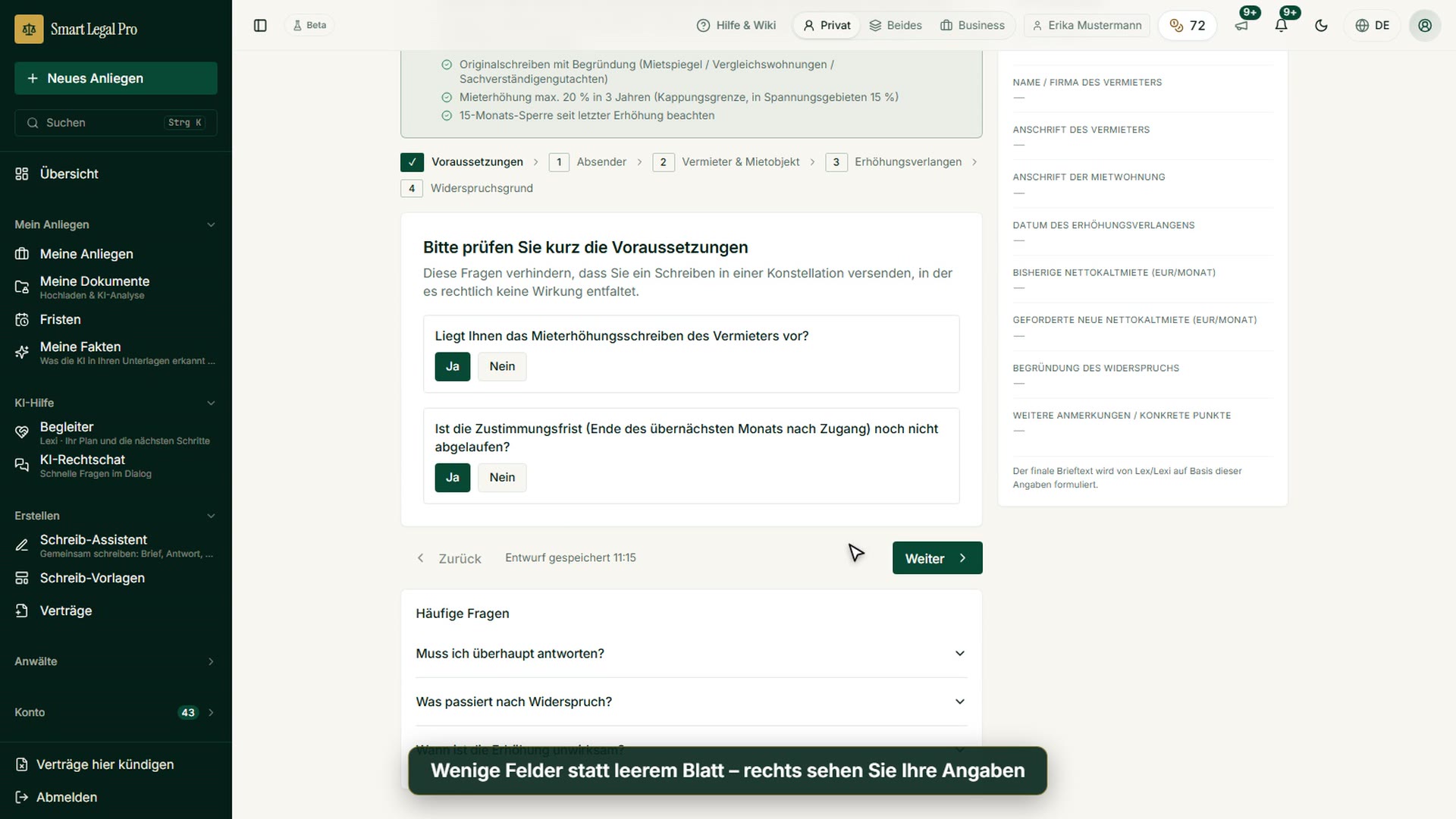
Objecting to a rent increase: clarify the prerequisites first, then write
The box “Legal framework” summarizes at the top what the objection is based on (§§ 558 ff. BGB, German Civil Code) and names three points to note. In the first step you answer two yes/no questions, such as whether you have the increase letter and whether the consent deadline is still running; the text explains that this way no letter without legal effect is sent. On the right, the list “Your details” collects what has already been captured, and at the bottom the assistant reports a saved draft. Below, frequently asked questions answer, for example, whether you have to reply at all.
Letter assistant: details on landlord, rental property and increase
The assistant guides you in four steps through sender, landlord and rental property, increase request and reason for objection; here step 3 is open. You enter the date of the increase request as well as the previous and demanded net base rent. On the right, “Your details” shows at any time what has already been captured and what is still missing, and below the form follow mandatory questions without which the letter would become generic or imprecise. The AI formulates the letter text from your details as a proposal that you review; names, addresses and amounts in the picture are fictitious examples.
All recordings use fictional sample data – no real cases, people or file numbers. AI output can contain errors and does not replace legal advice. The screenshots show the English interface; sample data and documents are partly in German. Smart Legal Pro itself is fully available in German, English, French, Italian, Spanish, Dutch and Polish.
More categories
- Case file & facts 43
- Deadlines 13
- Pleadings & editor 40
- AI assistant 35
- Lex & Lexi 20
- Contracts 26
- Firm & DMS 52
- Research & knowledge 21
- Collaboration & sharing 21
- Client portal 33
- Settings & firm 10
- Understanding proceedings 43
- Creating contracts 15
- Checking a contract 6
- AI legal information 30
- Calculators 10
- Tools 35
- Legal knowledge 2
- Account & credits 12

Try it yourself
Start free, upload a letter, check a deadline – no credit card needed.

